How To Downgrade iPhone 06.15.00 Baseband to 05.13.xx (iPhone 3G Bootloader 5.8 Only)
Saturday, January 01, 2011
Will now this method will help you to downgrade your iPhone 3G 06.15.00 to 5.13.xx which you will be able to unlockable using Ultrasn0w this will help you restore your device on the official firmware using iTune which was otherwise not possible on iPad’s 06.15.00 baseband. Until now this method work only at iPhone
3G with bootloader 5.8 The procedure is fairly straightforward, however we would not recommend novice users to try this. We will also highly recommend you to backup everything on your device before following the procedure. Proceed at your own risk only.
Here's what you need:
- Jailbroken iPhone 3G
- Fuzzyband installed via Cydia
- afc2add installed via Cydia
- i-FunBox (for Windows) or DiskAid (for Mac)
- Certificate to use with Fuzzyband.
STEP 1 : First download the required file ICE2-06.15.00.cert from here.
STEP 2 : After that install Fuzzyband from Cydia and launch the app
STEP 3 : Connect your iPhone 3G to PC using USB cable
STEP 4 : Launch i-FunBox and select file then navigate to Applications/Fuzzyband.app, right-click and then select Copy from PC.
STEP 5 : Select the ICE2-06.15.00.cert file you downloaded earlier and then copy it to this location: Applications/Fuzzyband.app.
STEP 6 : Now simply disconnect your iPhone from your computer and start Fuzzyband app (which you previously installed using Cydia) on your iPhone.
STEP 7 : In Fuzzyband, you will now see your current version of Baseband, (which should still be 06.15.00). But now you will have the option to downgrade it to version 05.13.xx.
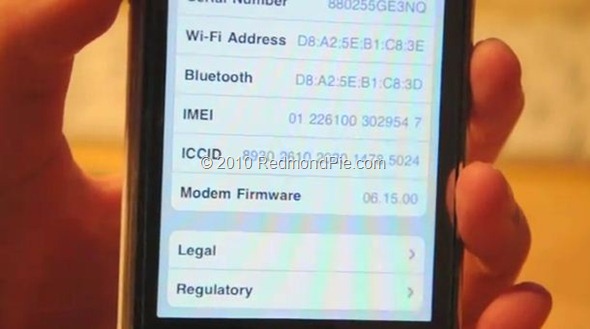
That's it you are done...Once you have downgraded, Go to Settings –> About, and scroll down to check your Baseband which should now read 05.13.xx (which is unlockable via Ultrasn0w). You can now also update or restore any firmware without iTunes throwing errors.
If you found this post useful, dont forget to click the +1 button =>
You can follow Geohot on Twitter or become a fan on Facebook or by Email Subscribe to get All news Free
Posted In:
Bootloader 5.8,
iPhone 3G
This entry was posted on October 4, 2009 at 12:14 pm, and is filed under
Bootloader 5.8,
iPhone 3G
. Follow any responses to this post through RSS. You can leave a response, or trackback from your own site.
How To Downgrade iPhone 06.15.00 Baseband to 05.13.xx (iPhone 3G Bootloader 5.8 Only)
Will now this method will help you to downgrade your iPhone 3G 06.15.00 to 5.13.xx which you will be able to unlockable using Ultrasn0w this will help you restore your device on the official firmware using iTune which was otherwise not possible on iPad’s 06.15.00 baseband. Until now this method work only at iPhone
3G with bootloader 5.8 The procedure is fairly straightforward, however we would not recommend novice users to try this. We will also highly recommend you to backup everything on your device before following the procedure. Proceed at your own risk only.
Here's what you need:
STEP 1 : First download the required file ICE2-06.15.00.cert from here.
STEP 2 : After that install Fuzzyband from Cydia and launch the app
STEP 3 : Connect your iPhone 3G to PC using USB cable
STEP 4 : Launch i-FunBox and select file then navigate to Applications/Fuzzyband.app, right-click and then select Copy from PC.
STEP 5 : Select the ICE2-06.15.00.cert file you downloaded earlier and then copy it to this location: Applications/Fuzzyband.app.
STEP 6 : Now simply disconnect your iPhone from your computer and start Fuzzyband app (which you previously installed using Cydia) on your iPhone.
STEP 7 : In Fuzzyband, you will now see your current version of Baseband, (which should still be 06.15.00). But now you will have the option to downgrade it to version 05.13.xx.
That's it you are done...Once you have downgraded, Go to Settings –> About, and scroll down to check your Baseband which should now read 05.13.xx (which is unlockable via Ultrasn0w). You can now also update or restore any firmware without iTunes throwing errors.
blog comments powered by Disqus
3G with bootloader 5.8 The procedure is fairly straightforward, however we would not recommend novice users to try this. We will also highly recommend you to backup everything on your device before following the procedure. Proceed at your own risk only.
Here's what you need:
- Jailbroken iPhone 3G
- Fuzzyband installed via Cydia
- afc2add installed via Cydia
- i-FunBox (for Windows) or DiskAid (for Mac)
- Certificate to use with Fuzzyband.
STEP 1 : First download the required file ICE2-06.15.00.cert from here.
STEP 2 : After that install Fuzzyband from Cydia and launch the app
STEP 3 : Connect your iPhone 3G to PC using USB cable
STEP 4 : Launch i-FunBox and select file then navigate to Applications/Fuzzyband.app, right-click and then select Copy from PC.
STEP 5 : Select the ICE2-06.15.00.cert file you downloaded earlier and then copy it to this location: Applications/Fuzzyband.app.
STEP 6 : Now simply disconnect your iPhone from your computer and start Fuzzyband app (which you previously installed using Cydia) on your iPhone.
STEP 7 : In Fuzzyband, you will now see your current version of Baseband, (which should still be 06.15.00). But now you will have the option to downgrade it to version 05.13.xx.
That's it you are done...Once you have downgraded, Go to Settings –> About, and scroll down to check your Baseband which should now read 05.13.xx (which is unlockable via Ultrasn0w). You can now also update or restore any firmware without iTunes throwing errors.
Subscribe to:
Post Comments (Atom)


